
Why onboard FRMCS is more than a router
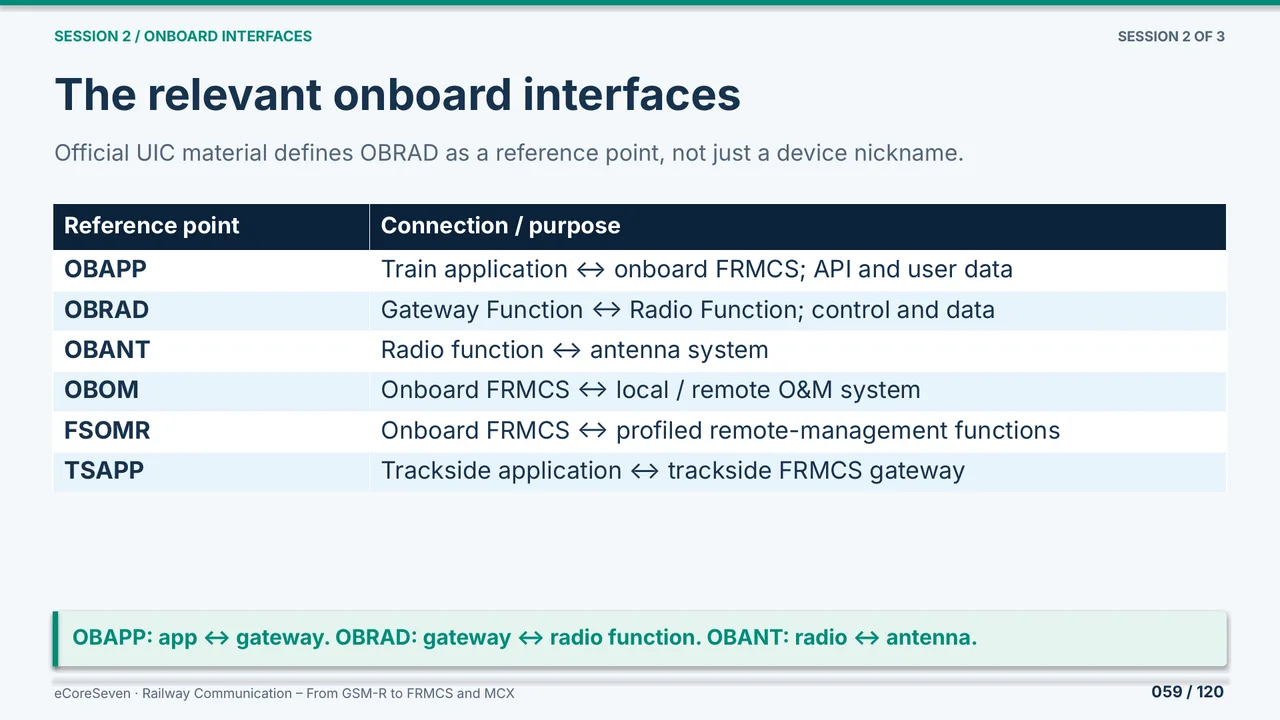
Onboard railway communication includes application access, service adaptation, radio connectivity and lifecycle management. A router with a mobile modem does not automatically implement all of this. FRMCS therefore defines reference points – named relationships between functions. They identify different responsibilities; they do not necessarily mean separate boxes or physical connectors.
| Reference point | Connects |
|---|---|
| OBAPP | Train application ↔ onboard FRMCS: API and user data |
| OBRAD | Gateway function ↔ radio function: control and data |
| OBANT | Radio function ↔ antenna system |
| OBOM | Onboard FRMCS ↔ local or remote operations and maintenance |
| FSOMR | Onboard FRMCS ↔ profiled remote-management functions |
| TSAPP | Trackside application ↔ trackside FRMCS gateway |
OBAPP: the onboard application interface
OBAPP connects railway applications – for example ETCS or the cab voice application – with the onboard communication functions. It has two planes:
- Control plane: trusted binding, sessions and notifications using structured application messages. The selected specification (FFFIS for OBAPP) uses HTTP/2, JSON, mutual authentication and TLS 1.3, with an event stream for asynchronous notifications.
- User plane: the application data itself, following the applicable application and coupling model. Voice is not sent as JSON.
Do not confuse this application control plane with the control plane of the 5G network – they belong to different architectural layers.
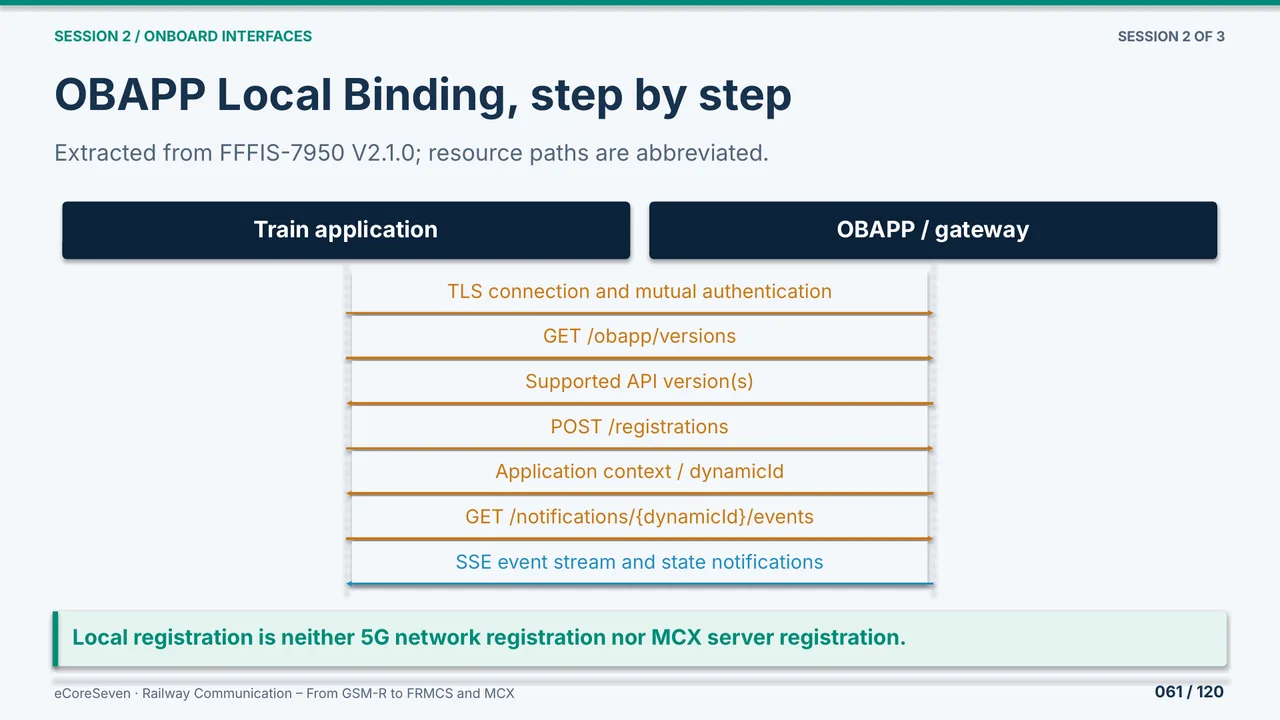
Local binding, step by step
- The application sets up a TLS connection with mutual authentication to the gateway.
- It asks which interface versions are supported and selects one.
- It registers its local identity; the gateway returns a dynamic context for later requests.
- It opens the event stream and receives state notifications.
This local registration is neither the 5G network registration nor the MCX server registration. Invalid certificates, unknown applications, interrupted streams and stale contexts need explicit handling.
Sessions and notifications
A session request and a working end-to-end session are different events. OBAPP supports requesting, listing, accepting and releasing sessions, and some outcomes arrive later through the event stream. A local keepalive only shows that the local endpoint responds – not that the remote application or the media path works.
OBRAD: a functional boundary, not a radio
OBRAD separates the gateway function from the radio function inside the onboard system. Its purpose is modularity: integrated or detachable radios, several radio modules and different modems where designed. UIC defines the required functions; ETSI TR 104 006 studies and recommends protocol options. These recommendations are not a complete universal interoperability profile – an implementation still needs agreed data models, operations, security, addressing and options.
OBRAD control with NETCONF, YANG and TLS
One assessed option uses NETCONF for control: the gateway is the NETCONF client, the radio adapter the server. Both establish mutual TLS with certificates, exchange their capabilities and then operate on an agreed YANG data model for configuration, state and notifications. Never invent modem commands from a diagram – obtain the actual model and profile first.
Three tunnels you must keep apart
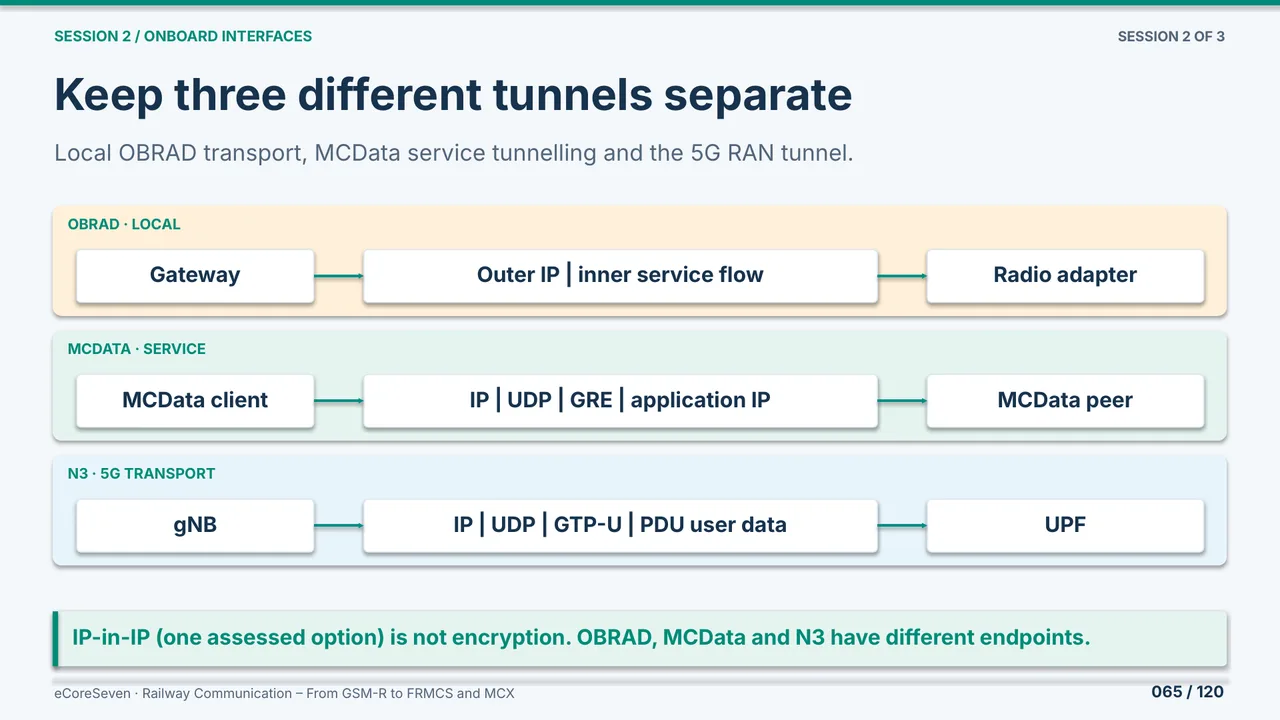
In an FRMCS onboard chain, three different tunnels can appear:
- OBRAD local: gateway to radio adapter, for example IP-in-IP – terminating at the adapter.
- MCData service: GRE over UDP for the MCData IP connectivity (IPcon) application tunnel.
- 5G N3: GTP-U between base station (gNB) and user plane function (UPF).
Their endpoints, headers and purposes differ, and each adds overhead that reduces the usable packet size. Encapsulation alone is not encryption – security and MTU need separate verification.
Testing OBAPP and OBRAD
- Test failure cases, not only success: wrong certificates, version mismatch, interrupted event streams, stale contexts.
- Test radio control separately from the radio data path.
- Correlate identifiers and timestamps across application, gateway, radio and network logs.
- Record the interface edition and options you actually tested.
Learn FRMCS and MCX hands-on
Online course “Railway Communication – From GSM-R to FRMCS and MCX”, including the practical module “MCX in Practice”: 90 minutes of video, 2 days in our online MCX lab and a certificate. €490 per participant.
See the course